

The benefits of a big rich snippet in the SERPs cannot be overstated.
You get more clicks, conversions, and better rankings in the process.
But how do you get them for your own Ecommerce website?
Can you get rich snippets to work with your CMS or website theme?
Read on to find out.
Learn about them:
Jump to how to for:
What are rich snippets?
A snippet refers to your websites link and description within Google, which is made up of your Page Title, Page URL, and your Page Meta Description.
A rich snippet simply refers to a snippet that contains rich data, descriptive for the type of web page that a user will visit if they click on it.
Here is an example of a rich snippet:
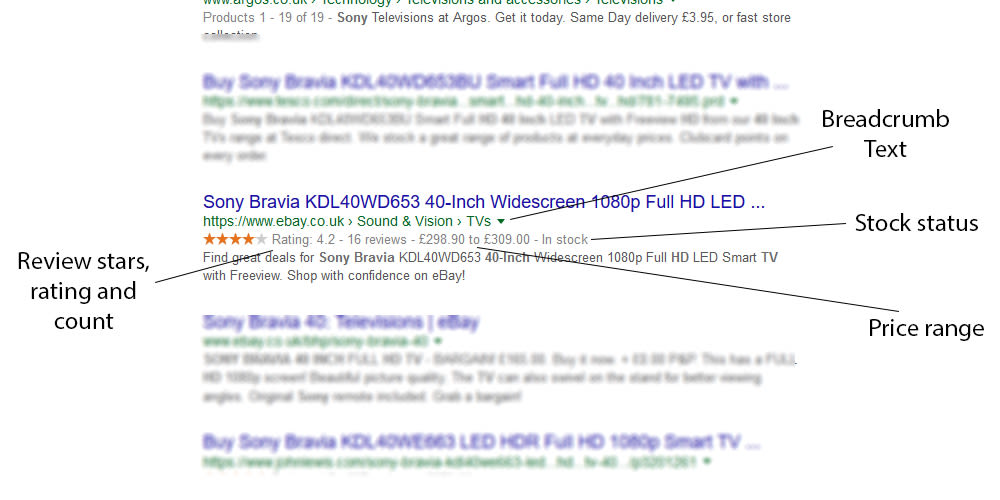 They can be used for Products, Recipes, Events, Local Businesses and many other types of web page.
History of Rich Snippets
Structured data (that creates rich snippets) has been around since the invention of Schema.org by the major search engines in June 2011. Here Bing, Google and Yahoo joined forces to set and support a common set of schemas for structured data markup on web pages, which allows search engines to better understand a page, and display rich snippets as a result.
In the year 2012 the ontology called GoodRelations was introduced into schema.org, which is more strongly associated with ecommerce websites.
Why use snippets in ecommerce?
Rich snippets are particularly important for ecommerce websites because the Product markup provides users with so much information before they click.
It shows users the price, whether the product is in stock, and how it has been reviewed.
When someone knows what they’re getting before they click (aka remove uncertainty) they are much more likely to feel safe in clicking the listing.
This results in more clicks, higher rankings and more sales.
So it’s well worth doing!
Best Snippets for Ecommerce Websites
Product Page Rich Snippets
Here are the most important rich snippets to include in your product pages, which are based upon the Product schema.org markup:
- Offer – this markup contains price information, and stock information.
- Name – the product name
- Image – the product image
- Aggregate Rating – this shows the average rating, used for the stars in the SERPs.
Those combined will give your website the full rich snippet in the search results.
Category Page Rich Snippets
Now category pages are slightly different, and don’t always provide you with a full rich snippet, however there are some bits of markup that can be beneficial here:
- SomeProducts – this can show the number of products in a category, the price range, similar type of product (using the Productontology categories), isSimilarTo, isConsumableFor, brand, category (and sub-categories using / ).
- VideoObject – if your category page contains a video then you can mark it up with this.
- Organization – Now this isn’t specific to your category page and can be applied to all pages, but it helps to tell Google about your company and related profiles (using sameAs).
Adding these to your category pages will help to increase the chance of you receiving a rich snippet there.
Platform Specific Rich Snippet Implementation
Here I will go over the best way to integrate rich snippets into your shopping cart, with specific solutions for Magento, Shopify, Woocommerce and Opencart.
Add Rich Snippets to a Magento Store
There are two options for adding this to your Magento website.
You either take the easy route, and purchase this well supported plugin which has a version both MG 1 and MG 2 – https://amasty.com/magento-google-rich-snippets.html
Or alternatively you can hard code the schema.org markup into your theme template, and there’s a great guide on how to do that here – https://www.creare.co.uk/blog/magento/magento-product-schema
Add Rich Snippets to a Shopify Store
Whilst there are a few Shopify themes that have rich snippets automatically integrated, the majority won’t be, and so first I’d recommend you put a product page into the Google Structured Data Testing Tool and see if the “Product” markup appears.
If it doesn’t, and you definitely want to integrate it, then out of the plugins I found I recommend using this one for $29 – https://apps.shopify.com/rich-snippets-for-seo
Add Rich Snippets to a Woocommerce Store
Now luckily for you, Woocommerce has rich snippets on both products and category pages by default in the latest version.
However it doesn’t include certain product information within the code that you may want to include (Brand, SKU, GTIN), and so if you want to go all out this plugin on Codecanyon is perfect at $59 – https://codecanyon.net/item/rich-snippets-wordpress-plugin/3464341?ref=mattjacksonseo
Add Rich Snippets to a Opencart Store
Like Shopify, some Opencart themes will include schema.org within their code already. And if you’ve installed a popular SEO plugin (such as the All in One SEO Pack) that may also have inserted the rich snippets already. So again, check your website in the testing tool before moving forward.
If you still need to implement it, then I recommend this plugin for OC version 1.5 (FREE) – https://www.opencart.com/index.php?route=marketplace/extension/info&extension_id=30554&filter_license=0&filter_download_id=19
And this plugin for OC version 2/3 ($20) – https://www.opencart.com/index.php?route=marketplace/extension/info&extension_id=32948
Customise Your Template Manually?
Instead of purchasing a plugin, perhaps you would rather customise your template manually.
There are several reasons why this might be a problem (such as updating themes removing the code), keeping up to date with changes etc, but it’s also quite fun to write your own JSON LD schema.org, and you also get to add loads more information than the plugins let you do.
Examples of JSON LD schema.org code for product pages: jsonld-schema-product-example.txt
Examples of JSON LD schema.org code for category pages: jsonld-schema-category-example.txt
Final Summary
If you get stuck then you can consult the Google FAQ page: https://support.google.com/webmasters/answer/1211158?hl=en
Or alternatively you can email me for some help, info@matt-jackson.com
Good luck implementing schema.org into your ecommerce website, and don’t forget to share if you enjoyed the article!
If you need a helping hand with your ecommerce SEO, then consider purchasing a customised SEO audit + action plan, or alternatively full SEO services.
